AE
http://www.voxyde.com/   網站提供免費的Script 語法
http://www.voxyde.com/content/utility-box/

還有影片教學可以觀看~
建議先看這個...因為它用新版的語法
https://www.youtube.com/watch?v=cnMGIpdUg6Q


看完以後
再看他原本的教學

語法面板雖然不一樣 但內容是差不多的
善用它 時間會省下不少~
Try!


AE一直再更新
上一個畫面還沒看熟 新版本又換了
看到新版的啟動畫面 無言
那就找方法換掉

早先用 Star screen after effects (連 start 都拼錯 orz...)
結果當然是沒有 然後尋找圖片
看到AE的啟動畫面點進去
就會看到右側有相似的圖

點一下 看到 Splash Screen 心裡想這才是正確的英文吧
接著用 after effects splash screen 去搜尋
就找到更換的方式啦~~~

https://forums.adobe.com/thread/2063905
adobe家的討論區 是說又沒有中文 真是圈圈叉叉
還好 我還會看圖
到 http://adobegeeks.blogspot.tw/2013/03/changing-adobe-after-effects-55-splash.html 這個網站
就有很清楚地說明了

首先 要找到 AfterFXLib.dll 這個檔案

Program Files / Adobe / Adobe After EffectsCC 2015.3 / Support Files /
底下剛好接著 AfterFx.exe 紫色AE小icon底下 AfterFXLib.dll
要修改這個檔案前,請先複製該檔到別的資料夾存放 (萬一改錯了 還可以救回來)

然後想要開啟 dll 檔 請先下載 Ressource Hacker 程式 http://www.angusj.com/resourcehacker/

用 ResourceHacker.exe 開啟 AfterFXLib.dll
看到左邊的 PNG 資料夾點開

看到 AE_SPLASH:0 按下去 就會出現他的圖片
然後看到程式最下方 有 700 X 540 PNG
則是該圖片的像素大小
做一張一樣大的PNG檔來替換吧~

我看到splash 都換了,三張圖片大小不一
儲存後更新 就可以開啟AE

如果更換的圖片大小不一樣,那麼AE可能無法開啟....這得再找出當初的AfterFXLib.dll 覆蓋~
如果不懂電腦的人 還請不要擅自更換,要不AE掛掉就麻煩啦~~


色彩怎麼調整
最好有類型可以參考
如果沒有
就找現成的色板特效來修改
A_6049385


A_6049612


A_6049650


B_6049434

B_6049451


B_6049454

B_6049460

B_6049692

B_6049743

B_6049786


ffx download http://ge.tt/5ZjuBHb2


動態~


不知道哪一年 adobe 出了  Media Encoder
因為事業沒有做很大 所以也就不理會
最近為了 Youtube 才想到也許有

Premiere 可以用export輸出 Youtube 適用格式
那麼After Effect 就靠 Media Encoder 了

File → Export → Add to Adobe Media Encoder Queue

出現 Format / H.264 (youtube 就用這個格式了)
還有其他格式可換 ex.Animated GIF 是說 我以前傻傻用 Potoshop 算出 GIF檔是傻的呀~

Preset /  選擇你想要 PO出影片的地方 ,再上傳到該地 就會出現最佳畫質啦~
有 Amazon Kindle Fire / Apple TV / Facebook / TiVo / Vimeo / Youtube


按小綠色的三角 ▲ 就開始算圖啦~

Try it!


尋找玫瑰花瓣
去Flickr網站
搜尋 Rose Petal
允許商業用途
下載原尺寸然後把花瓣一個一個挖下來~


Heart  心型花辮


Love  文字花瓣


Transitions  花瓣轉場


Falling 花瓣落下


petal falling 花瓣飄零


Sprinkle flower  花瓣灑落


TRY IT!


file download link
https://dl.dropboxusercontent.com/u/576/Petals_1.aep 

https://dl.dropboxusercontent.com/u/576/Petal_a.mov


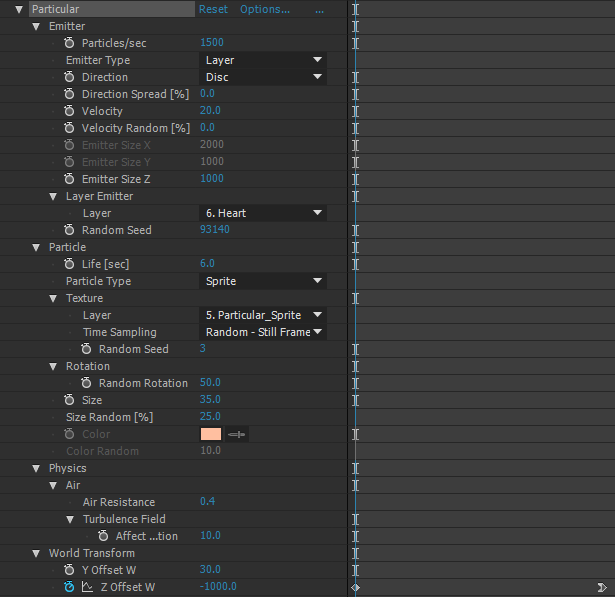
Particular 從前有很多免費案例可以下載
現在好像都很難看到了~


在solid上畫上心的路徑
然後貼在 Particular
Emitter Type / PositionXY


心如果越來越小
那就要畫出路徑來
懶人是用一顆心複製 再去縮小
然後一個接一個貼上,後來的沒有變小 想當然爾 就是最後路徑一直重複貼囉~


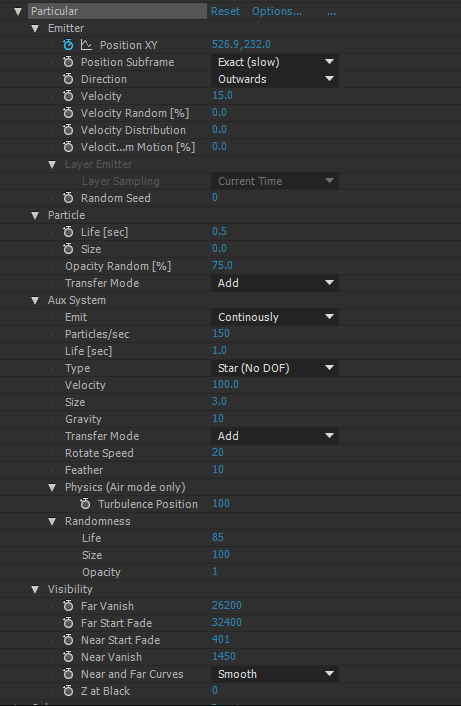
旁邊跑出來的是另外一個particular

download https://dl.dropboxusercontent.com/u/576/heart%20sample.aep  particular 2.2.6 版本 2015cc


做一顆屬於你自己的心吧!
Try it!

這裡有一顆心 http://motionworks.net/after-effects-experiment-6/ 
是 Oliver Chaffe 用 Advanced Lightning 做的
去逛逛吧~


較新的文章 較舊的文章 首頁

Particular 3.1 分子運動介紹

  • Particular 3.1 分子運動介紹 00
  • Particular 3.1 分子運動介紹 01
  • Particular 3.1 分子運動介紹 02
  • Particular 3.1 分子運動介紹 03
  • Particular 3.1 分子運動介紹 04
  • Particular 3.1 分子運動介紹 05
  • Particular 3.1 分子運動介紹 06

POPULAR POSTS

  • Simulation 10 shatter 碎裂
  • Distort 各式各樣的變形 _ 前段
  • Comp Screenshot / AE螢幕擷取
  • Anchor Point 定位點
  • Simulation 6 CC Particle World 分子世界
  • shape layer 圖形層_01
  • Particular 3.1 分子運動介紹 01
  • Transition 轉場特效 A
  • Particular 3.1 分子運動介紹 00
  • Particular 3.1 分子運動介紹 04

Blog Archive

  • 2026 3
    • 6月 2
      • AI 公司
      • After Effects 的 AI外掛
    • 3月 1
  • 2025 7
    • 12月 1
    • 10月 1
    • 9月 1
    • 8月 2
    • 7月 1
    • 4月 1
  • 2024 10
    • 11月 2
    • 9月 1
    • 7月 2
    • 6月 4
    • 1月 1
  • 2023 2
    • 4月 1
    • 3月 1
  • 2022 6
    • 12月 1
    • 10月 1
    • 9月 1
    • 7月 2
    • 4月 1
  • 2021 6
    • 12月 1
    • 8月 1
    • 6月 2
    • 2月 2
  • 2020 5
    • 11月 1
    • 7月 1
    • 2月 1
    • 1月 2
  • 2019 6
    • 10月 2
    • 9月 1
    • 6月 2
    • 3月 1
  • 2018 7
    • 11月 1
    • 10月 2
    • 9月 1
    • 8月 1
    • 7月 2
  • 2017 15
    • 11月 3
    • 10月 1
    • 9月 3
    • 8月 1
    • 7月 2
    • 4月 3
    • 3月 1
    • 2月 1
  • 2016 16
    • 10月 2
    • 9月 1
    • 8月 3
    • 7月 1
    • 6月 1
    • 4月 2
    • 3月 1
    • 2月 3
    • 1月 2
  • 2015 5
    • 9月 1
    • 5月 2
    • 4月 1
    • 1月 1
  • 2014 10
    • 12月 1
    • 11月 1
    • 7月 2
    • 3月 2
    • 2月 3
    • 1月 1
  • 2013 43
    • 12月 2
    • 11月 2
    • 10月 1
    • 9月 6
    • 8月 7
    • 7月 4
    • 6月 2
    • 5月 4
    • 4月 6
    • 3月 3
    • 2月 4
    • 1月 2
  • 2012 11
    • 11月 2
    • 10月 2
    • 9月 4
    • 8月 1
    • 5月 2

Categories

  • Effects 48
  • Sample 32
  • plugin 28
  • Basic 17
  • 文言 17
  • Free 16
  • Text 9
  • Particular 8
  • shape 7
  • 3D 6
  • AI 5
  • Link 4
  • Script 4
  • color 4
  • element 3D 4
  • Gold 2
  • background 2
  • firefly 2
  • C4D 1
  • Font 1
  • Lut 1
  • brush 1
  • ffx 1
  • shape layer 1
  • shape layer ramp 1
  • shape sample 1

Sample Text

如果可以的話
你也來寫 AE 教學吧~
每個人的敘事方式不一樣
會產生不同風格喔~
Try it!

Distributed By Gooyaabi | Designed by OddThemes