AE
色彩怎麼調整
最好有類型可以參考
如果沒有
就找現成的色板特效來修改
A_6049385


A_6049612


A_6049650


B_6049434

B_6049451


B_6049454

B_6049460

B_6049692

B_6049743

B_6049786


ffx download http://ge.tt/5ZjuBHb2


動態~


不知道哪一年 adobe 出了  Media Encoder
因為事業沒有做很大 所以也就不理會
最近為了 Youtube 才想到也許有

Premiere 可以用export輸出 Youtube 適用格式
那麼After Effect 就靠 Media Encoder 了

File → Export → Add to Adobe Media Encoder Queue

出現 Format / H.264 (youtube 就用這個格式了)
還有其他格式可換 ex.Animated GIF 是說 我以前傻傻用 Potoshop 算出 GIF檔是傻的呀~

Preset /  選擇你想要 PO出影片的地方 ,再上傳到該地 就會出現最佳畫質啦~
有 Amazon Kindle Fire / Apple TV / Facebook / TiVo / Vimeo / Youtube


按小綠色的三角 ▲ 就開始算圖啦~

Try it!


尋找玫瑰花瓣
去Flickr網站
搜尋 Rose Petal
允許商業用途
下載原尺寸然後把花瓣一個一個挖下來~


Heart  心型花辮


Love  文字花瓣


Transitions  花瓣轉場


Falling 花瓣落下


petal falling 花瓣飄零


Sprinkle flower  花瓣灑落


TRY IT!


file download link
https://dl.dropboxusercontent.com/u/576/Petals_1.aep 

https://dl.dropboxusercontent.com/u/576/Petal_a.mov


Particular 從前有很多免費案例可以下載
現在好像都很難看到了~


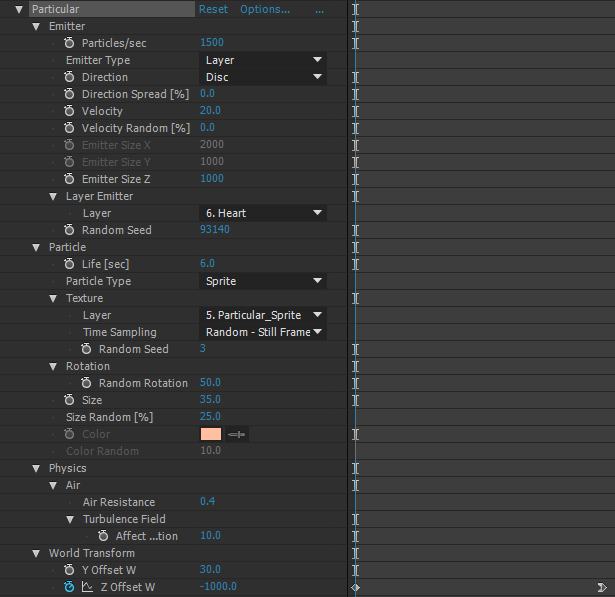
在solid上畫上心的路徑
然後貼在 Particular
Emitter Type / PositionXY


心如果越來越小
那就要畫出路徑來
懶人是用一顆心複製 再去縮小
然後一個接一個貼上,後來的沒有變小 想當然爾 就是最後路徑一直重複貼囉~


旁邊跑出來的是另外一個particular

download https://dl.dropboxusercontent.com/u/576/heart%20sample.aep  particular 2.2.6 版本 2015cc


做一顆屬於你自己的心吧!
Try it!

這裡有一顆心 http://motionworks.net/after-effects-experiment-6/ 
是 Oliver Chaffe 用 Advanced Lightning 做的
去逛逛吧~


對Particular有興趣學習的人可以到
http://people.redgiantsoftware.com/Explore/
有很多sample 案例 可以下載學習

學到 看到別人做粒子運動的效果時
自己知道大概要怎麼做出來
ex.

影片裡閃亮亮的掉落 該怎麼做

Effects / Particular

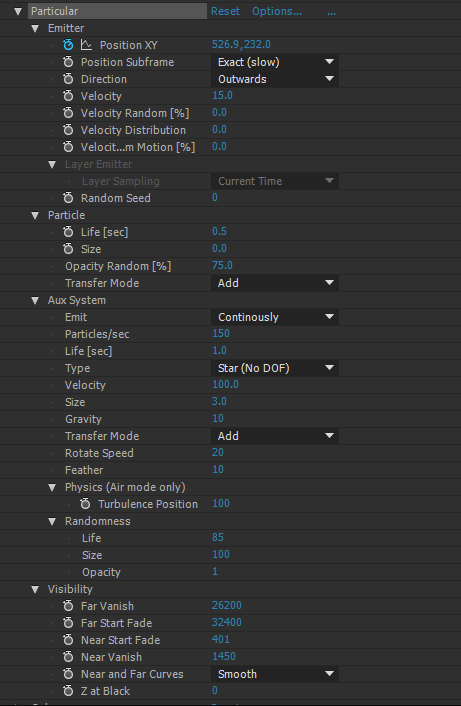
Particle Type : Star (No DOF)
Opacity over Life:
Layer / Mask Path 貼到
Emitter /Position XY 


Emitter /
Velocity :0 
Velocity Random[%] :0
Velocity Distribution:0
Velocity from Motion[%]:0

Aux System /
Emit: Continously
Gravity: 300


Particle /
Color :#E78800
Aux System /
Color over Life

Aux System /
Life[sec]:3
Physics(Air mode only) /
Air Resistance :1


接著就製造差異性
Aux System /
Randomness / Life:100

Aux System /
Transfer Mode : Add
Randomness / Size:50 Opacity:50


falling star.aep from ge.tt

Try it!


較新的文章 較舊的文章 首頁

Particular 3.1 分子運動介紹

  • Particular 3.1 分子運動介紹 00
  • Particular 3.1 分子運動介紹 01
  • Particular 3.1 分子運動介紹 02
  • Particular 3.1 分子運動介紹 03
  • Particular 3.1 分子運動介紹 04
  • Particular 3.1 分子運動介紹 05
  • Particular 3.1 分子運動介紹 06

POPULAR POSTS

  • Simulation 10 shatter 碎裂
  • Distort 各式各樣的變形 _ 前段
  • Comp Screenshot / AE螢幕擷取
  • Anchor Point 定位點
  • Simulation 6 CC Particle World 分子世界
  • shape layer 圖形層_01
  • Transition 轉場特效 A
  • Particular 3.1 分子運動介紹 01
  • Particular 3.1 分子運動介紹 00
  • Frosted glass 霧面玻璃

Blog Archive

  • 2026 3
    • 6月 2
      • AI 公司
      • After Effects 的 AI外掛
    • 3月 1
  • 2025 7
    • 12月 1
    • 10月 1
    • 9月 1
    • 8月 2
    • 7月 1
    • 4月 1
  • 2024 10
    • 11月 2
    • 9月 1
    • 7月 2
    • 6月 4
    • 1月 1
  • 2023 2
    • 4月 1
    • 3月 1
  • 2022 6
    • 12月 1
    • 10月 1
    • 9月 1
    • 7月 2
    • 4月 1
  • 2021 6
    • 12月 1
    • 8月 1
    • 6月 2
    • 2月 2
  • 2020 5
    • 11月 1
    • 7月 1
    • 2月 1
    • 1月 2
  • 2019 6
    • 10月 2
    • 9月 1
    • 6月 2
    • 3月 1
  • 2018 7
    • 11月 1
    • 10月 2
    • 9月 1
    • 8月 1
    • 7月 2
  • 2017 15
    • 11月 3
    • 10月 1
    • 9月 3
    • 8月 1
    • 7月 2
    • 4月 3
    • 3月 1
    • 2月 1
  • 2016 16
    • 10月 2
    • 9月 1
    • 8月 3
    • 7月 1
    • 6月 1
    • 4月 2
    • 3月 1
    • 2月 3
    • 1月 2
  • 2015 5
    • 9月 1
    • 5月 2
    • 4月 1
    • 1月 1
  • 2014 10
    • 12月 1
    • 11月 1
    • 7月 2
    • 3月 2
    • 2月 3
    • 1月 1
  • 2013 43
    • 12月 2
    • 11月 2
    • 10月 1
    • 9月 6
    • 8月 7
    • 7月 4
    • 6月 2
    • 5月 4
    • 4月 6
    • 3月 3
    • 2月 4
    • 1月 2
  • 2012 11
    • 11月 2
    • 10月 2
    • 9月 4
    • 8月 1
    • 5月 2

Categories

  • Effects 48
  • Sample 32
  • plugin 28
  • Basic 17
  • 文言 17
  • Free 16
  • Text 9
  • Particular 8
  • shape 7
  • 3D 6
  • AI 5
  • Link 4
  • Script 4
  • color 4
  • element 3D 4
  • Gold 2
  • background 2
  • firefly 2
  • C4D 1
  • Font 1
  • Lut 1
  • brush 1
  • ffx 1
  • shape layer 1
  • shape layer ramp 1
  • shape sample 1

Sample Text

如果可以的話
你也來寫 AE 教學吧~
每個人的敘事方式不一樣
會產生不同風格喔~
Try it!

Distributed By Gooyaabi | Designed by OddThemes