上一篇 Particular 3.1 分子運動介紹 00
_______________________________________________
介紹 Emitter

Emitter Behavior 發射器類型
Continuous 持續性發射Explode (爆炸) 一次性發射
From Emitter Speed 依據發射器的移動速度


**********************************************************************************
Particles/sec 每秒數量

**********************************************************************************
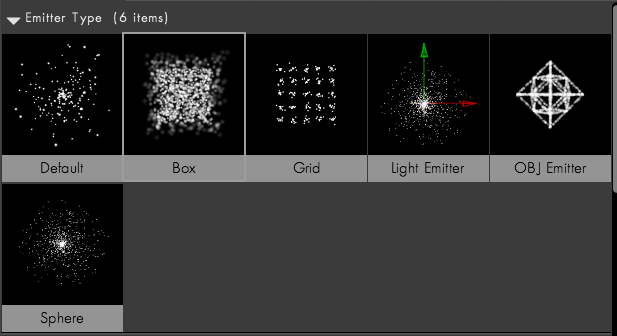
Emitter Type 發射器形狀
Point 點狀發射

Box 盒狀發射

Sphere 球狀發射

Grid 格狀發射

 Continuous 持續性發射粒子 所以粒子會微變大 @@~
Particles in X
Particles in Y
Particles in Z

Type 類型
Periodic Burst 片段展現

Traverse 橫列展現

Light(s) 隨光發射
 新增燈光 且取名為 Emitter
如果要更名 到 Emitter Naming / Choose Names
影響陰影的燈光也可另外取名

Box 盒狀發射
Sphere 球狀發射
Grid 格狀發射


Grid Emitter 格狀發射器
各軸向粒子數量Particles in X
Particles in Y
Particles in Z

Type 類型
Periodic Burst 片段展現

Traverse 橫列展現

Light(s) 隨光發射
如果要更名 到 Emitter Naming / Choose Names
影響陰影的燈光也可另外取名

另外燈光的 Intensity 也會影響粒子數量

Cone Angle 圓錐角度 影響

燈光邊緣羽化

參考教學
https://vimeo.com/15114434
Layer 圖層 /
Layer Emitter 圖層發射器 /
Layer 指定圖層Layer Sampling 圖層樣式
Current Time Particle Birth Time Still

Current Time 與 Still 看不出差異 則
在使用 Aux System / Emit : Continuously 之後

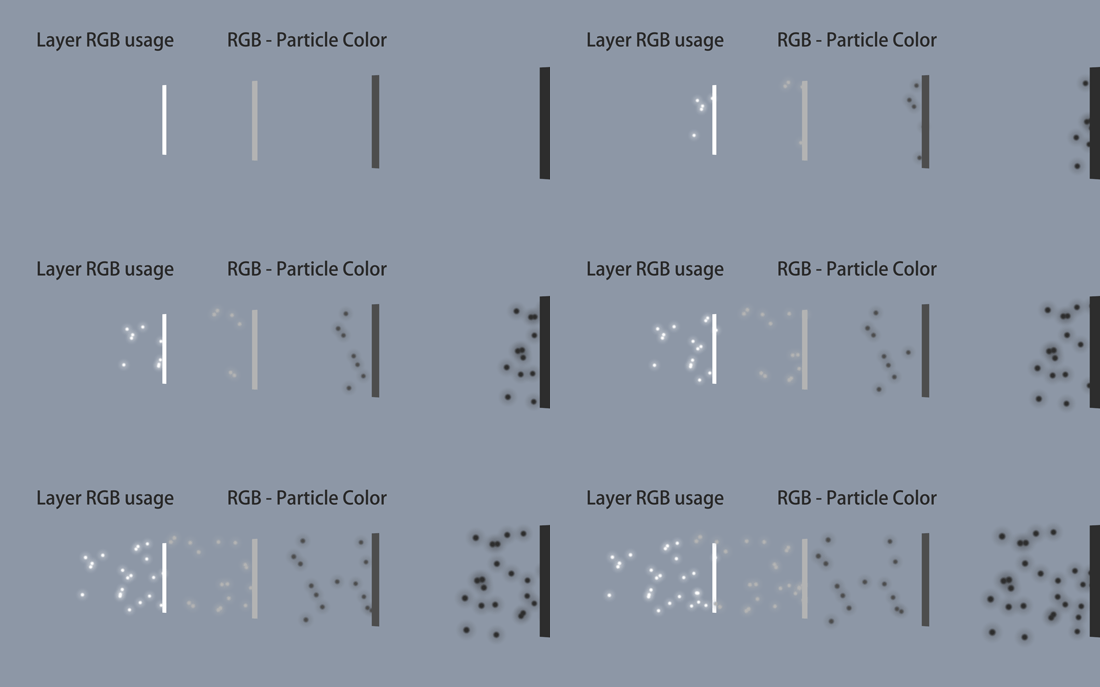
Layer RGB Usage 圖層色彩利用
Lightness - Size (越亮粒子越大)

Lightness - Velocity ( 最亮與最暗的速度相反)

Lightness - Rotation ( 最亮與最暗的轉動速度相反 居中就無轉動現象啦)

RGB - Size Vel Rot ( 色彩影響 大小 速度 轉動速度)

RGB - Particle Color ( 色彩為粒子顏色)
None ( 不具影響力)

RGB - Size Vel Rot + Col ( 色彩影響 大小 速度 轉動速度 再加 粒子顏色 )

RGB - XYZ Velocity ( 色彩影響 XYZ軸向 速度 )

RGB - XYZ Velocity + col ( 色彩影響 XYZ軸向 速度 再加 粒子顏色 )

Layer Grid 圖層格數

OBJ Model / 3D物件
Choose OBJ 選擇物件
OBJ Emitter 物件發射器

Emit From Vertices (頂點)

Emit From Edges (邊線)

Emit From Faces (面)

Emit From Volume (體積)

Normalize ( 法線 )

InvertZ ( Z軸 反轉)

Sequence Speed 連續物件 速度

Sequence offset 連續物件 位移

OBJ Sequence Cortrol 連續物件 控制

**********************************************************************************
Position Subframe 位置修整

可參考日文網頁 說明
http://donodono.sakura.ne.jp/trap/source_file/emitter.html
**********************************************************************************
Direction 方向
Uniform 均衡方向
Directional 單一方向

Bi-Directional 雙向

Disc 圓盤


Outwards 向外

**********************************************************************************
Direction Spread 方向散佈


**********************************************************************************
Rotaion 旋轉方向

**********************************************************************************
Velocity 速度

**********************************************************************************
Velocity Random [%] 速度隨機

**********************************************************************************
Velocity Distribution 速度分佈
Velocity Random [%] 需設定變數

Velocity from Motion [%] 速度跟隨 (Emitter)動作

**********************************************************************************
Emitter Size 發射器大小

XYZ Individual

**********************************************************************************
Particles/sec Modifier 分子數量 / 秒 調整


**********************************************************************************
Emission Extras 額外的發射
Pre Run 先跑

Perodicity Rnd 週期性跑
用於 Layer Grid
Grid Emitter / Type → Traverse

Lights Unique Seeds 燈光獨特的粒子
燈光當Emitter 為複數的時候 看得出差異

Perodicity Rnd 週期性跑
用於 Layer Grid
Grid Emitter / Type → Traverse
Lights Unique Seeds 燈光獨特的粒子
燈光當Emitter 為複數的時候 看得出差異

**********************************************************************************
Random Seed 隨機粒子出現

#######################################
下一篇 Particular 3.1 分子運動介紹 02